Projects / Guardian
Case studyGuardian VietnamPricing operations · Excel VBA

Promotion price list consolidation and vendor-funding calculation

Responsible for consolidating buyer submissions into the monthly promotion price list (LL) and for calculating the vendor-funded top-up on new deals twice a week. Both processes were automated in Excel VBA, reducing the main monthly update from about two days to half a day.

RoleBusiness Administration Executive
PeriodOct 2025 - Jan 2026
ToolsExcel VBA · Outlook
StakeholdersBuyers, Trade, Online, Data, IT
Data noteThe demo uses synthetic buyers, vendors, SKUs and prices (±10-20%) in line with the NDA. Process and business rules reflect the actual workflow.
~2 days → ½main monthly LL update
12-15buyers per cycle
2× / weekvendor-funding file to the Data team
4funding types handled
01

Context and responsibilities

Each promotion cycle began with one price list issued to 12-15 buyers. Buyers returned edited copies, often in several versions, which were reconciled manually. New deals also had to be assessed twice a week for the additional discount they introduced and the share funded by vendors.

Responsibility 1

Monthly LL consolidation

  • Prepared buyer templates with locked fields, dropdown lists and record IDs.
  • Consolidated buyer submissions against the frozen LL and resolved exceptions.
  • Issued the semi-final and final LL to Trade, Marketing and all departments.
Responsibility 2

Vendor-funding top-up

  • Calculated the incremental discount of each new deal against the active price layers.
  • Allocated vendor funding by funding type: Vendor 100%, Co-share, Claimback.
  • Delivered the price set-up file to the Data team twice a week.
Responsibility 3

Validation and coordination

  • Maintained the validation rules for prices, dates and deal combinations.
  • Followed up buyers on missing or invalid submissions.
  • Sent the approved set-up file and vendor funding to IT and the Data team.
Promotion cycle, D-30 to D-1

Scope covered
D-30Price intake

Trade sends prices; buyer deals, trade plan and vendor deals are combined.

D-23Buyer submissions

Buyers return their LL copies, often in several versions.

D-21Semi-final LL

Consolidated LL to Trade and Marketing for SKU review.

D-15Final master list

Final LL sent to all departments.

D-6Price request + IT setup

Promotion prices approved; setup file and vendor funding to IT and the Data team.
D-1Go-live

Price update completed in the systems and online.

Dark: steps covered by the LL consolidation tool. Green: the top-up calculation, repeated twice a week as new deals are added.

02

Process design

Two linked processes share one source of data: the monthly stream produces the final LL, and the twice-weekly stream calculates top-ups on top of it.

Stream AMonthly LLExcel VBA
SendBuyer packs

One file per buyer: locked columns, dropdowns, hidden record IDs.

ReceiveBuyer files

12-15 buyers, several revisions, any order.

ScanReplay + rules

Changes vs. the frozen LL; BLOCK / WARN rules; review only the unclear.

OutputLL_Final · LL_Master

Colour-coded changes, update log, backup.

LL_Master is the base layer
Stream BTop-up, 2× a weekExcel VBA
InputNew deals

Double Day, buyer deals, flash sales for this run date.

StackActive layers

LL prices, member price, 1-2 month vendor deals, earlier deals.

CalculateTop-up + vendor share

Extra discount vs. the current price, split by funding type.

Hand-offData team → Online

Price set-up file with a calculation trail.

Step automatedOutput used by other teams
03

Monthly LL consolidation

The tool processes all buyer files against the frozen LL and produces the final LL with a change log.

Guardian_Run.xlsm · ControlLive
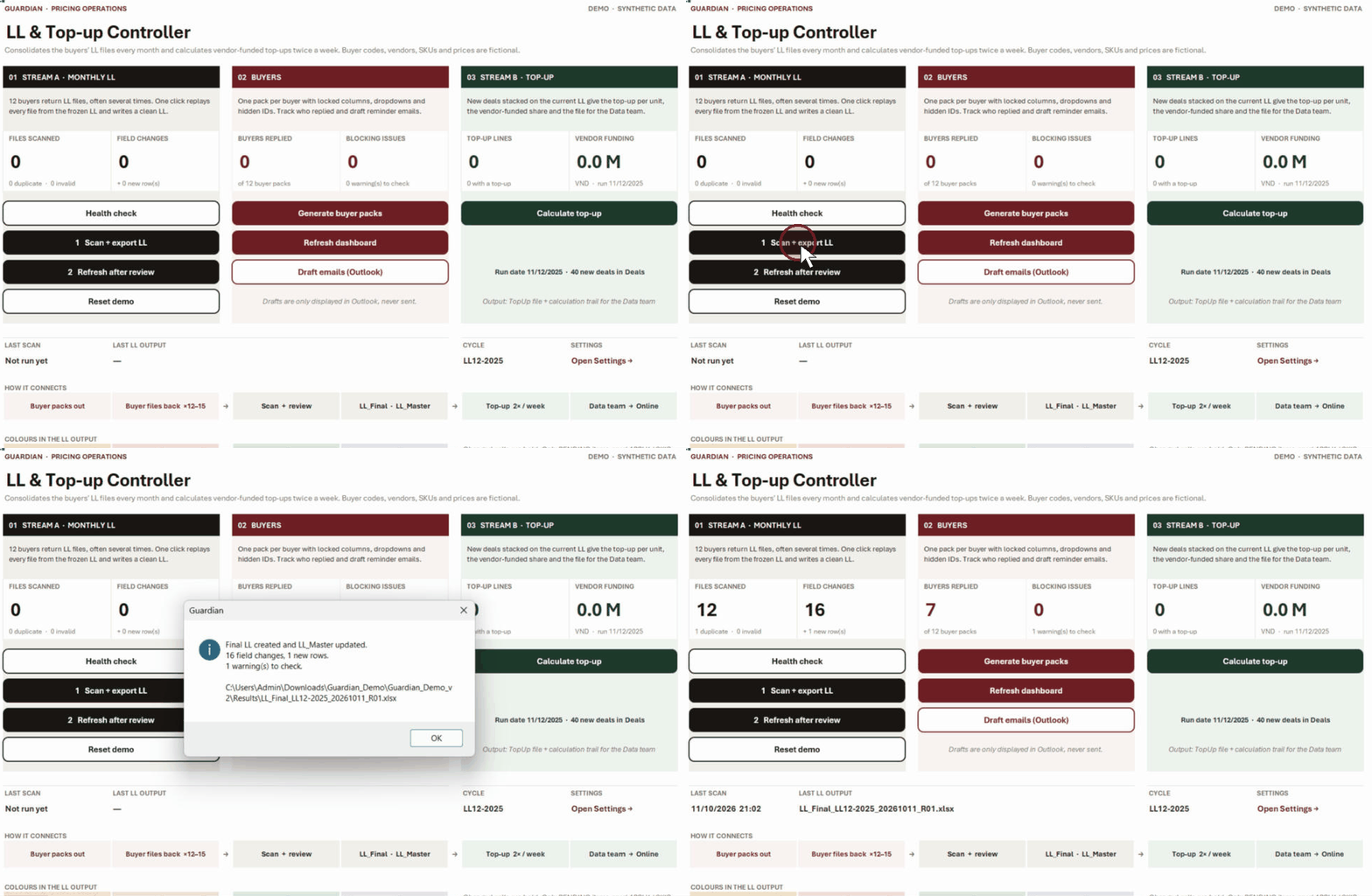
Guardian controller: one click scans 12 buyer files; counters fill with 12 files, 16 field changes, 7 buyers replied
Single run. Duplicate files are identified by content fingerprint rather than file name.
  1. 1
    Replay against the frozen LLEach run starts from the LL issued to buyers and applies all submissions in order of receipt, so runs are repeatable.
  2. 2
    Match by header and record IDHidden record IDs and header names are unaffected by moved columns or re-sorted rows.
  3. 3
    Record net changes onlyEach submission is compared with the buyer's previous version; changes later reverted are excluded.
  4. 4
    Escalate unclear changesClear changes are applied automatically; unclear ones are held for an APPLY / SKIP decision, which is retained for later runs.
  5. 5
    Report changesThe final LL is colour-coded by price, programme and vendor funding, with a full update log.
16 field changes1 new row1 duplicate skipped1 warningdemo run

Exception handling

Validation rules
RuleExample in the demoSeverity
Locked field editedNormal price changed by the buyerBLOCK
Value not in the listFunding type “Supplier pays”BLOCK
Dates out of orderEnd date before start dateBLOCK
Unknown productNew row with a mistyped SKU, not marked NewBLOCK
Price sanityPromo price above normal price

BLOCK holds the affected buyer's submission out of the final LL until corrected, while other buyers are published. WARN is applied and listed for review. Reminder emails are prepared as Outlook drafts for manual sending.

The live process also applied deal-combination rules, including a 50% cap on total promotion value, no buy-one-get-one on top of a direct discount, and no overlap between purchase-with-purchase and combo offers.

04

Vendor-funding top-up calculation

Each new deal is evaluated against the price layers active on its start date. Only the incremental discount, the top-up, is subject to vendor funding.

Worked example · demo deal D1211-096

Skincare SKU, Double Day 12.12, normal customers

VND per unit
Normal priceLL
ABS
123,000
Long-term deal priceLL, 2-month vendor deal
ABS
111,000
LL promo pricelowest absolute price → base
ABS
86,000
Buyer deal, 9-21 Decextra amount off
−AMT
−5,000
Price before the new dealalready supported
81,000
Double Day target pricenew deal
TARGET
73,000
Result for this line
Top-up per unit8,000
Funding typeCo-share, vendor 50%
Vendor funding per unit4,000
× forecast 140 units560,000 VND
before = (min ABS − Σ AMT) × Π(1 − PCT)
top-up = max(0, before − new price)
vendor = round(top-up × share)
Vendor 100%The vendor funds the full top-up.Deduct from next invoice
Co-shareSplit by the agreed vendor %.Co-share settlement
ClaimbackVendor-funded, claimed on actual sell-out.Claim after sell-out
Self-fundingNo vendor funding; the top-up is absorbed by Guardian.Not in the demo
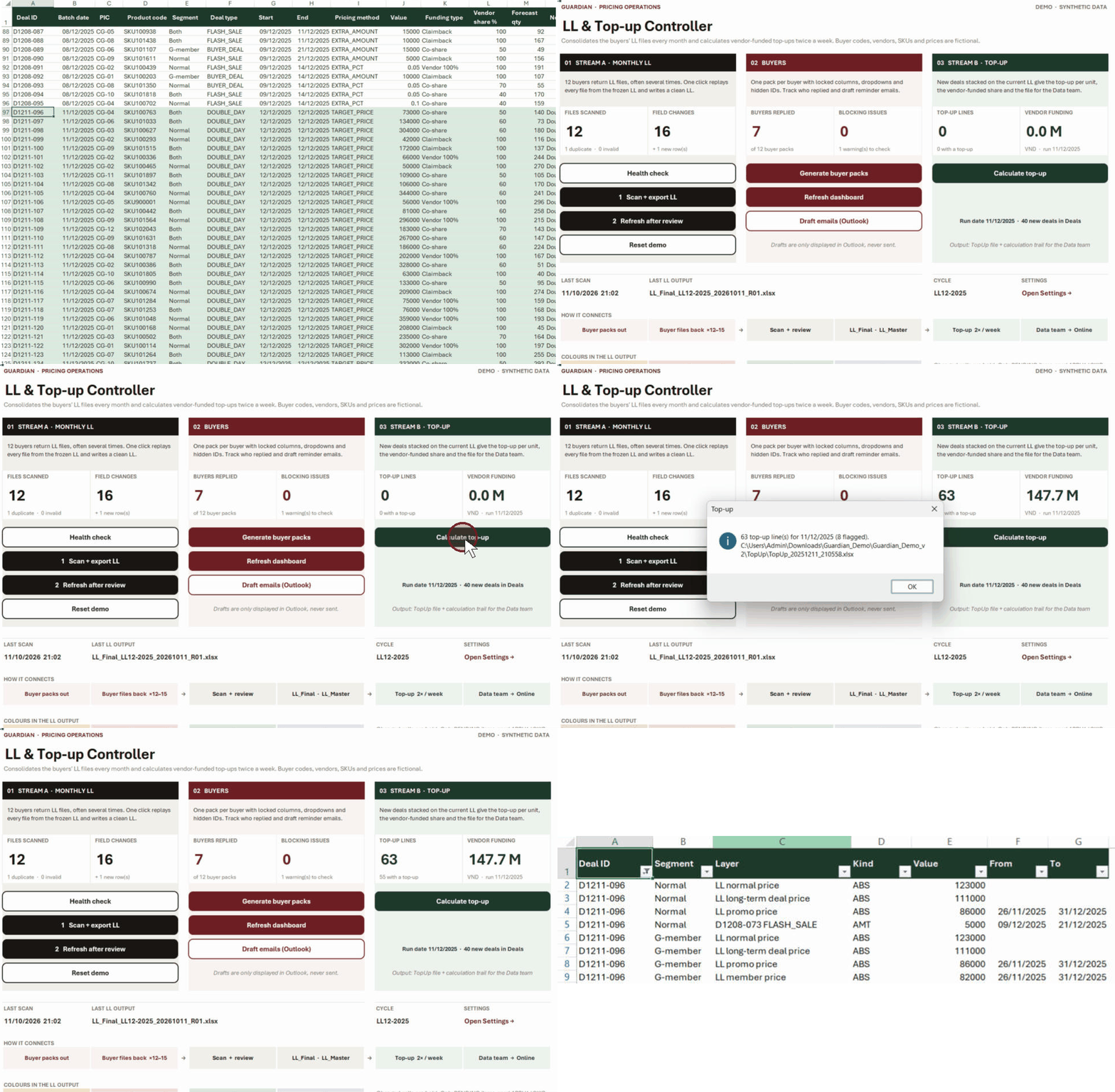
Guardian_Run.xlsm · Deals → Control → TopUp fileLive
New Double Day deals, Calculate top-up, 63 lines and 147.7M VND vendor funding, then the calculation trail for one deal
Full calculation trail for every output line.
  1. 1
    Active layers onlyLayers are included only if active on the deal start date, e.g. a running two-month vendor deal.
  2. 2
    Calculated per customer segmentNormal and member customers may have different current prices; one deal can produce two top-up lines.
  3. 3
    No negative top-upsWhere the new price is not below the supported price, the line is flagged rather than funded.
  4. 4
    Data team hand-offEach line includes funding type, settlement method and forecast vendor total.
63 lines55 with a top-up8 flaggeddemo run, 11/12/2025

In the live process this calculation ran in KNIME. The demo implements the same rule in Excel for review.

05

Outcomes

Results from the live process. The demo reproduces the method, not the figures.

2 days → ½ dayfor the main monthly LL update, from receipt of buyer files to the final LL.
Fewer errorsChanges are applied directly from buyer files under locked fields and validation rules, without re-keying.
On scheduleVendor-funding file delivered to the Data team twice a week, in time for price set-up.

Key takeaway

Process mapping preceded automation. The main source of error was inconsistent buyer files: moved columns, multiple versions and overwritten formulas. Documenting each rule across the D-30 to D-1 cycle provided the basis for a reliable tool. VBA and KNIME skills were developed on the job for this purpose.

Recommended next step

A management dashboard built on the same data, reporting top-up and vendor funding by vendor, buyer and cycle.

06 · Demo files

Demo workbook and VBA code

Requires Excel desktop on Windows. Import the four VBA modules and save the workbook as .xlsm. Expected results are included for verification.

Synthetic data only: buyer codes CG-01 to CG-12, fictional vendors, SKUs and prices.